Nov 6, 2026
Can Claude Generate Videos? 4 Ways That Work
Can Claude generate videos? Not on its own: it has no video model. Here are the 4 ways it makes video today, what each produces, and how to pick one.

Can Claude generate videos? Yes, but not the way a text-to-video model does. Claude has no video model of its own, so it makes video by writing animation code or by driving tools that render, generate or assemble the file. That leaves four real routes today, and each one hands back something different: an animation, a code-rendered clip, an AI shot or a finished narrated video.
This guide covers what each route produces, what it asks of you and how to pick one. We build Go Motion, one of the tools below, so we say where it fits and where it does not, and we share the numbers from a real test run.
Can Claude generate videos on its own?
No. Does Claude generate videos from a prompt the way Veo or Kling does? It does not, because none of its models outputs video frames. Anthropic's Claude Motion help article is direct about its own animation feature: it "doesn't use a video generation model", so it can't create realistic footage or people.
So does Claude do video generation at all? Indirectly, yes. Claude is strong at the work around the render:
- Writing scripts, shot lists and prompts for a video model.
- Writing code that draws and animates text, charts and shapes.
- Calling connected tools, checking on their jobs and returning the file.
The frames, the voice and the final MP4 come from something else. That is why "can Claude create videos?" has four honest answers rather than one.
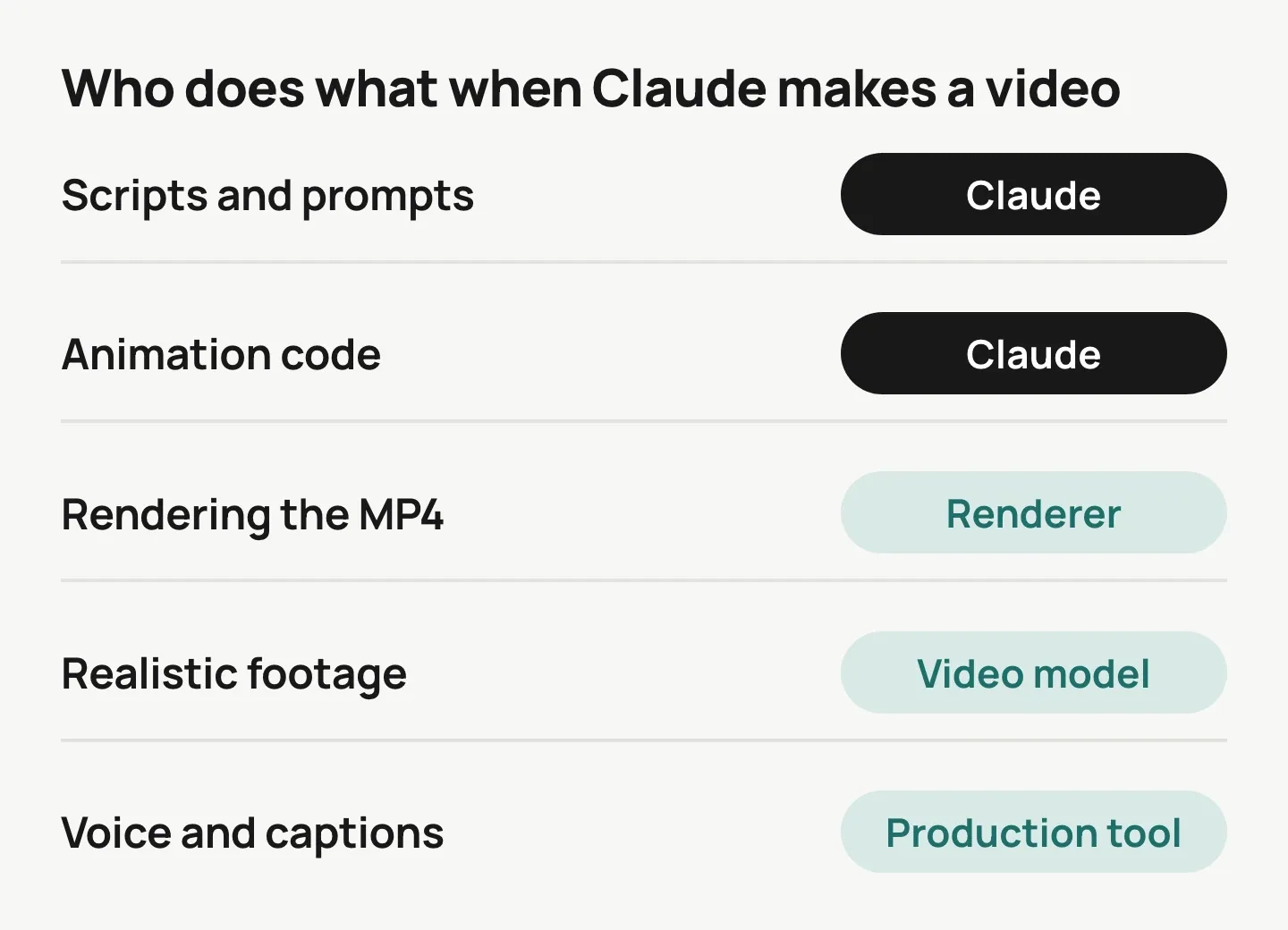
The 4 ways Claude video generation works
When people ask can Claude generate videos, they usually mean one of these four setups. The first two make graphics, the third makes AI footage and the fourth makes a complete narrated video.
1. Claude Motion: built-in animation
Claude Motion turns your content into short animations, such as an explainer, an animated chart or a product walkthrough. You ask in a chat, attach your report or images, and Claude builds the animation as code inside an artifact. Because it is code, you can change one word, number or timing and the rest stays as it was. When it looks right, you export an MP4.
The limits are clear. It is a beta for Team and Enterprise plans, longer animations use more of your plan's limit, and it makes graphics rather than footage.
2. Claude Code with Remotion or HyperFrames
In Claude Code, Claude writes a video as a small program and a renderer turns it into an MP4. Remotion uses React, and HyperFrames from HeyGen uses HTML and CSS. The same code renders the same video every time, which suits templates, data videos and branded intros.
You need a paid Claude plan that includes Claude Code and some comfort with a terminal. Check licensing too: Remotion is free for individuals and companies of up to three people, larger companies pay for a license, and HyperFrames is open source under Apache 2.0. Like Claude Motion, this route draws graphics, not footage.
3. A connector to a video model
For realistic shots, you connect Claude to a service that runs video models over MCP, the protocol Claude uses to call outside tools. Services such as Higgsfield route your request to models like Veo, Kling or Seedance, and Claude hands back the clip. This is what most people picture when they search for a Claude AI video generator, and it is the only route here that generates footage of people and places.
Expect two bills: usage on your Claude plan and credits on the connected service. Custom connectors work on every plan, with Free limited to one. Clips usually run a few seconds, so a longer video means generating, reviewing and joining many shots.
The best Claude connectors for video generation are the ones that offer the models you need and bill in a way you can predict. Whether it is sold as a connector or a Claude video generation plugin, read what it can do before you approve it, because Anthropic has not verified custom connectors.
4. An agent skill for finished narrated videos
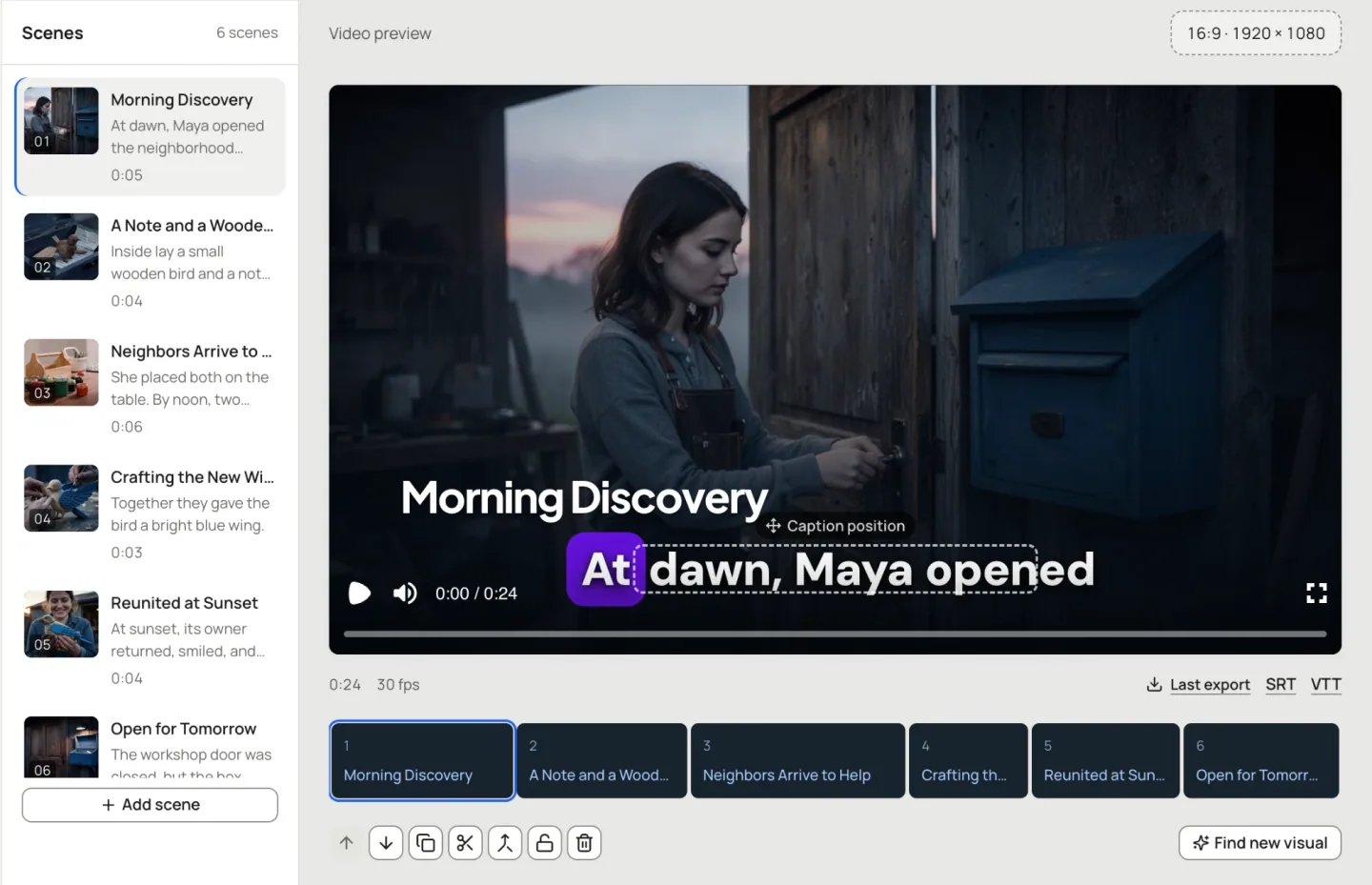
A skill is a small package that teaches a coding agent a workflow. Claude skills for video generation come in two kinds: some wrap a renderer, and some wrap a full production pipeline. The Claude video generation skill we built, the Go Motion agent skill, is the second kind. Claude runs the job from your terminal, shows you each price and script, and applies your changes. Go Motion produces the voiceover, captions and matched pictures, then renders a 1080p MP4 with SRT and VTT caption files.
This route fits explainer videos and faceless channels, where the job is minutes of narration rather than one striking shot. It runs in Claude Code, Codex or Cursor, not in a regular Claude chat. Its pictures are stock footage, licensed images and AI illustrations, so it will not give you generated actors or cinematic scenes.
Which route fits your video?
Pick by what you need to hand over at the end, not by which tool claims to be the best Claude video generator. Claude video creation looks very different across these four, so the table starts from the result.
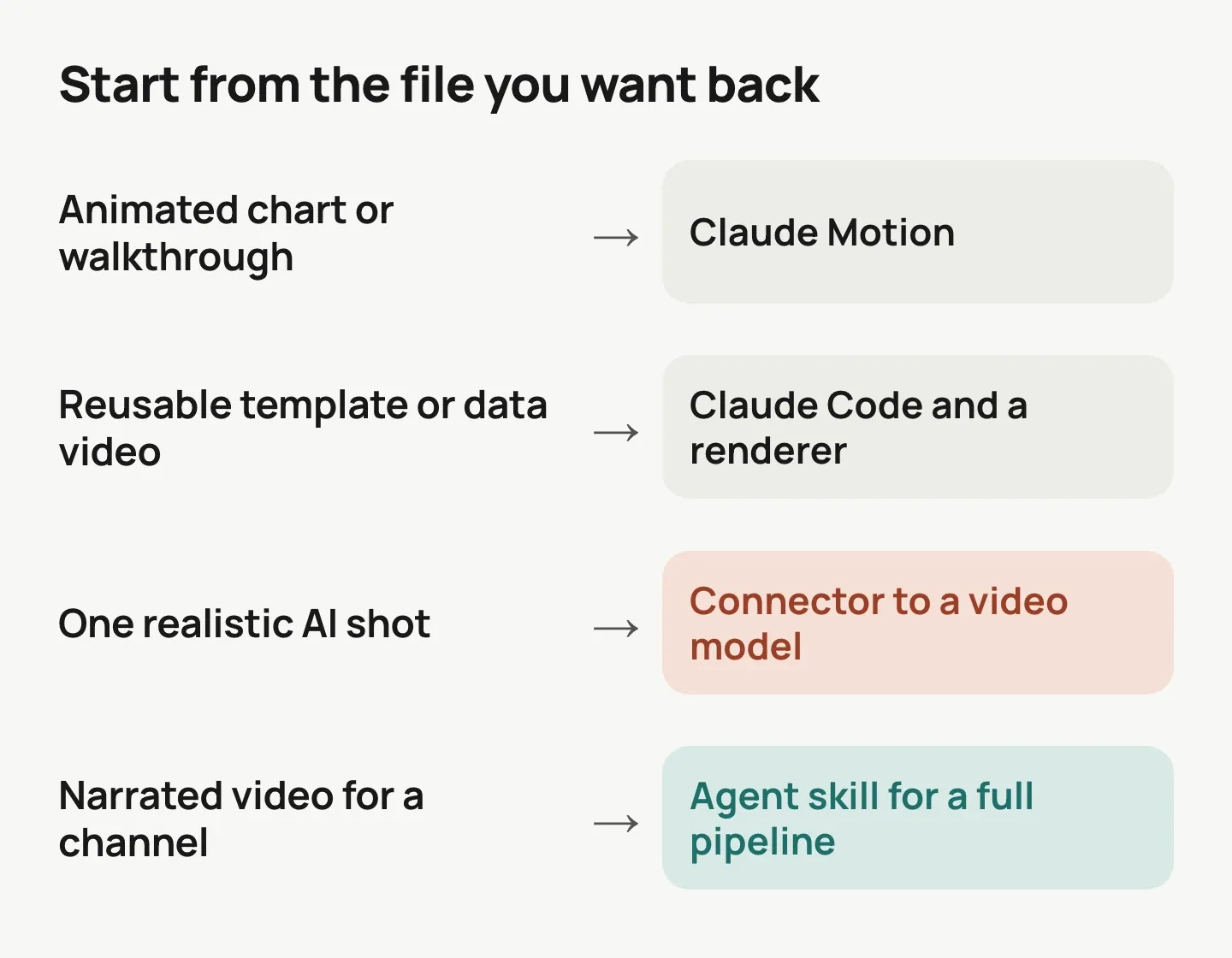
| Route | What comes back | Realistic footage | What you need | Best for |
|---|---|---|---|---|
| Claude Motion | Short animation as MP4 | No | Team or Enterprise plan | Internal explainers, animated charts |
| Claude Code and a renderer | Code-rendered MP4 | No | Plan with Claude Code, a terminal | Templates, data videos, branded intros |
| Connector to a video model | AI clip, usually seconds long | Yes | A connector and its credits | Single shots you assemble yourself |
| Agent skill (Go Motion) | Narrated, captioned 1080p MP4 | Stock and licensed only | A coding agent, an API key | YouTube, TikTok and Reels explainers |
So can Claude make videos for a channel, a deck and an ad with one setup? Rarely. The short answer to can Claude generate videos for your project depends on which row matches the file you need.
How to make Claude generate videos: a real 60-second run
Here is how to make videos with Claude on route four, using a run we did on October 29, 2026, on our live service with a test account.
- Install the skill. Run
npx skills add gomotionai/gomotion-skill, then put your API key in theGOMOTION_API_KEYvariable. You need Node.js 18 or newer. - Brief it. We asked Claude Code for a 60-second 16:9 explainer on why the sky is blue. The draft was free, and Claude quoted the price of the script first.
- Approve the script. Go Motion wrote five scenes and 172 words in 44 seconds, and Claude showed them in the chat for review.
- Approve production. Voice, captions and pictures took 3 minutes 13 seconds.
- Export. The render took 2 minutes 39 seconds and returned a 1920×1080 MP4 at 30 fps, plus SRT and VTT files.
That is about six and a half minutes of waiting, and you upload the MP4 yourself. Three details from the run are worth knowing:
- Prices round up per started minute. The first script ran an estimated 61 seconds, which priced production as two minutes. Trimming six words brought it to 59 seconds and halved that step. Aim for 50–55 seconds when you want one minute.
- The finished length counts too. The video came out at 60.4 seconds, so export billed two minutes and the run cost 50 credits. A normal minute costs about 45 credits, and current prices are here.
- Picture sources vary. This video used three stock shots, one AI illustration and one NASA image that needs a credit line. The skill saves those credits in a text file beside the video.
Each finished video also opens in the studio for edits, shown here with a different project.
Prompts that work on each route
A good Claude video generation prompt says who will watch, where it will play and how long it should run, then attaches your source material. Anthropic gives the same advice for Claude Motion. A starting point for each route:
- Claude Motion: "Animate the three key numbers in this attached report as a 30-second opener for our team meeting. Use our brand colors."
- Claude Code: "Build a 20-second Remotion intro for our podcast with a logo reveal and an episode title I can change. Render it at 1080p."
- Connector: "Write a shot brief for a slow aerial move over a foggy pine forest at sunrise, generate one 16:9 clip, and show me the prompt you used."
- Agent skill: "Make a 60-second 16:9 explainer about why octopuses have three hearts, curious and friendly, for a science channel."
What Claude still can't do in video
The honest answer to can Claude generate videos also depends on which of these limits you can live with:
- Create realistic footage alone. Lifelike scenes always come from a connected video model.
- Promise a clean result. Video models can refuse a prompt or add details you never asked for, so review every shot.
- Settle rights for you. Keep any credit lines your pictures require, and check the terms of the service that made your clips.
- Supply a point of view. Tools can speed up production, but a channel still needs original ideas. Our YouTube automation guide covers where the monetization rules draw that line.
FAQ
Can Claude make videos for free?
Only in a limited way. Claude Motion needs a Team or Enterprise plan, and Claude Code needs a paid plan. A Free account can add one custom connector, but the video service behind it usually charges. Go Motion gives new accounts 60 free credits, enough for a first one-minute video in its web studio.
Can Claude make videos from images?
Yes, in two ways. Claude Motion and the code route can animate images you attach, which suits slides, charts and product shots. For realistic motion, a connector can send your image to an image-to-video model, which returns a short generated clip. Results depend on that model rather than on Claude.
Can Claude make YouTube videos?
Yes, with the right tool behind it. The skill route returns a narrated 16:9 or 9:16 MP4 with caption files that you upload yourself. Claude can also draft the title and description. For monetization the video still needs original value, so plan your format before you publish at volume.
Can Claude Code generate videos?
Yes. Claude Code is the most flexible route because it can run software on your computer. With Remotion or HyperFrames it writes and renders a video from code, and with the Go Motion skill it drives a full narrated production. Either way, the renderer or service produces the final file, not Claude itself.
Can Claude do animated videos?
Yes, and this is where Claude does best with video. Claude Motion builds animations from your prompt, and Claude Code can write them for Remotion or HyperFrames. Both suit text, charts, diagrams and simple shapes. Neither produces lifelike characters or camera footage, so that work needs a connected video model instead.
Can Claude generate videos from a script I already wrote?
Yes. On the skill route, hand Claude a text file where blank lines separate the scenes. The writing step is skipped, so only production and export are billed. Claude Motion and the code route can work from your text too, though they turn it into on-screen animation rather than a narrated video.
Which Claude model is best for video generation?
No Claude model renders frames, so the output depends on the renderer, video model or pipeline behind it. Model choice matters most on the code route, where a stronger model tends to write more reliable animation code. For connectors and skills, use the model your plan allows and compare the results.
Make your first video
So, can Claude generate videos? With the right tool behind it, yes. If your goal is a narrated video for a channel, you can test that today: describe an idea, approve the script and download an MP4 with captions.